
Communal allows you to create an unlimited number of admin accounts, enabling your team and board to efficiently manage your community. Assign one or many admin accounts today!
How to Create and Admin Account (video)
- Select the People tab and then Users on the left-hand side of the admin portal.
- Search for the user by email, name, or member ID. If this is a new user, you'll need to make them an account by clicking Create User.
- While creating their account, enter their primary information (name, email, etc).
- Leave the Password field blank as the system will automatically trigger an email for them to create their password upon account creation.
- After the admin account is created you'll need to assign their administrative roles to control which areas they can access:
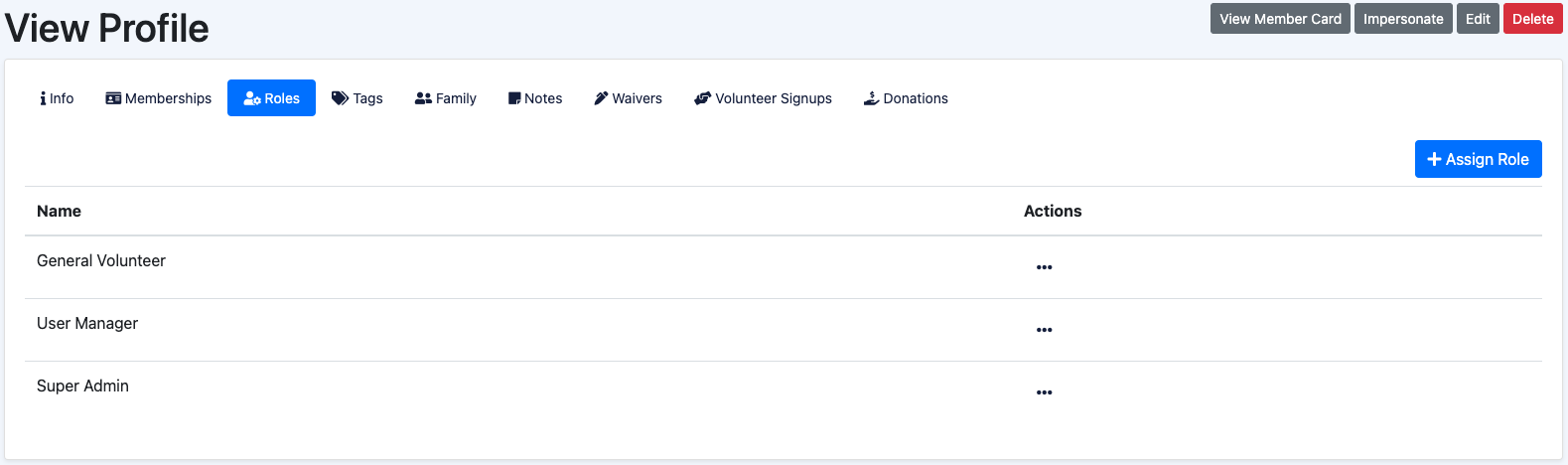
- While viewing their account, go to the Roles tab and assign the appropriate roles as seen below:
Role Descriptions
1. Super Admin
Key Abilities
- Can do every ability of every Manager role. Only assign this role to users who should have access to every area of functionality within Communal.
- Able to create other Super Admins
2. User Manager
Key Abilities
- Create, update, delete user information
- Create, update, delete organization information
- Impersonate as a user
- View and edit user family information
- Send emails to users
3. Membership Manager
Key Abilities
- Assign and remove memberships to users
- Create and update membership types and plan information
- Full access to all areas under People
- Full access to all areas under Tools
- Access to necessary settings: General, appearance, actions, boundaries, membership cards, custom notifications, welcome email, user settings
- Access to membership report
4. Program Manager
Key Abilities
- Create, update, delete programs
- Create, update, delete program signups for users or guests
- Set and review waitlist settings and those on the waitlist
- Assign and remove memberships to users
- Create and update membership types and plan information
- Full access to all areas under People
- Full access to all areas under Tools
- Access to necessary settings: General, appearance, actions, boundaries, membership cards, custom notifications, welcome email, user settings
5. Facility Manager
Key Abilities
- Create, update, delete facilities
- Create, update, delete bookings
- Manage booking items
- Generate invoices from bookings
- Full access to all areas under People
- Full access to all areas under Tools
- Access to necessary settings: General, appearance, actions, boundaries, membership cards, custom notifications, welcome email, user settings
6. Volunteer Manager
Key Abilities
- Create, update, delete volunteer opportunities
- Create, update, delete volunteer shifts
- Create, update, delete volunteer signups
- Publish and unpublish volunteer opportunities
- Full access to all areas under People
- Full access to all areas under Tools
- Access to necessary settings: General, appearance, actions, boundaries, membership cards, custom notifications, welcome email, user settings
7. Reporting Manager
Key Abilities
- View transaction list and all other reporting pages under the Reporting tab
- View payout information
- Full access to all areas under Tools
- Full access to all areas under Donations
- Access to necessary settings: General, appearance, actions, boundaries, custom notifications, welcome email,
8. Finance Manager
Key Abilities
- View billing and invoice information as well as everything else under Tools and Settings
- Full access to Donations
9. Donation Manager
Key Abilities
- Full access to manage, edit, and create donations and fundraisers
- Full access to all areas under People
- Full access to all areas under Tools
- Access to necessary settings: General, appearance, actions, boundaries, membership cards, custom notifications, welcome email, user settings
10. Communications Manager
Key Abilities
- Those with this role will only be able to view, edit, and manage Notifications, Custom Notifications, Actions, and the Welcome email
11. General Volunteer
Role information
- This is a default system role, it does not provide any access to any area of the site to users.
12. API Manager
Role information
- Provides the ability to access and manage API keys